

Imagine a bakery owner with three employees and truly excellent cakes. Her website gets about nine visitors a week, and most of them are relatives. She doesn’t need an agency retainer. She needs a handful of good tools and a free afternoon.
That’s the idea behind this list. The best SEO tools aren’t the ones with the longest feature lists; they’re the ones that tell you something useful you can act on today. Several of the best free SEO tools come from Google itself, and a few paid options earn their price once your site starts to grow.
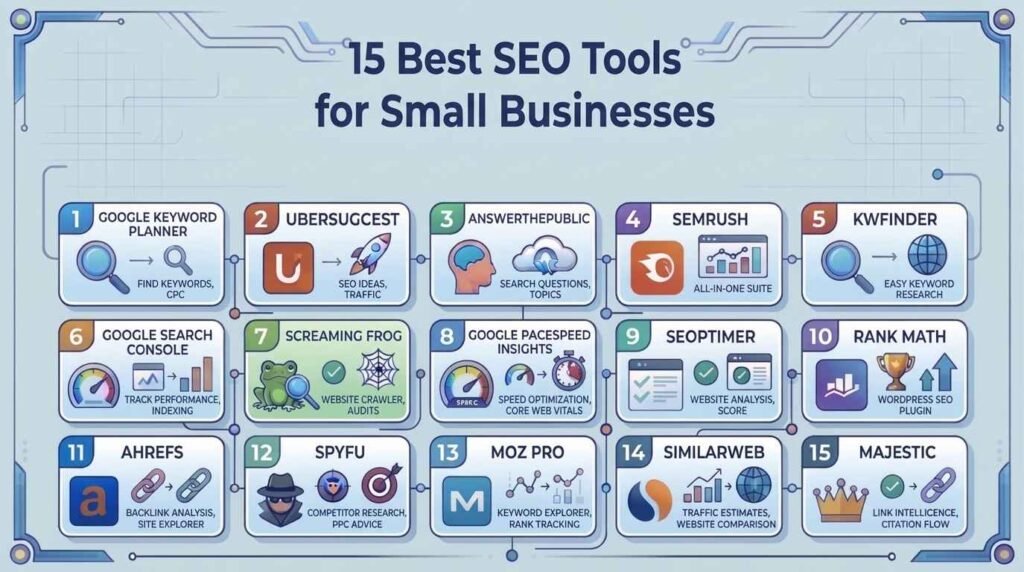
Below you’ll find 15 tools split into three jobs: finding keywords, fixing technical problems, and spying on competitors. Every entry ends with a “first move”, one small action to take as soon as you log in.
If you only have ten minutes: set up Google Search Console and look up your main service in a keyword tool. Everything else can wait.
Choosing Your Toolkit
Three things should decide what you sign up for.
- Money: a free tool you use beats a paid one you forget about.
- Your biggest headache: no visitors means keywords first; visitors who leave means technical fixes; a rival who keeps outranking you means competitor research.
- Your platform: WordPress has plugins that Wix or Shopify owners can’t install.
Keyword Research Tools
Before you write or rewrite a single page, find out which words real customers type. These five tools help you do that at different price points.
1. Google Keyword Planner
Google’s own idea generator lives inside the Ads dashboard, but you can use it without launching a campaign. Search volumes appear as broad ranges, so read them as hints rather than exact counts. First move: type your service plus your town and write down every suggestion that matches something you genuinely sell.
2. Ubersuggest
Created by marketer Neil Patel, this tool bundles keyword ideas, difficulty scores, and a light site audit behind one login. The free plan caps your daily searches, which is fine while you’re learning. First move: enter a competitor’s website and see which keywords it shows for them.
3. AnswerThePublic
It turns one phrase into a web of questions, comparisons, and “with” or “for” searches. Each question is basically a ready-made blog topic or FAQ entry. First move: search your best-selling product and copy every “how” and “can” question into a spreadsheet.
4. Semrush Keyword Magic Tool
Semrush holds a very large keyword database and sorts ideas into subtopics, so you can see clusters rather than a messy list. It’s priced above most small-business budgets, so treat it as an upgrade rather than a starting point. First move: filter the results to low difficulty and look for terms you could cover in a single page.
5. KWFinder (Mangools)
The interface is clean, and the difficulty score is colour-coded, which makes it easy to judge a keyword at a glance. It also lets you set a city or region. First move: look up a service keyword for your own area and compare it with the national version.
Technical SEO Tools
A page can be well written and still invisible if Google can’t reach it or visitors give up waiting for it. Technical tools reveal those problems.
6. Google Search Console
This free dashboard shows what Google knows about your site: which searches show it, which pages are indexed, and which pages have errors. First move: open the Performance report, sort by impressions, and find pages sitting around positions 8 to 20. They’re the closest to page one, so improving them often pays off fastest.
7. Screaming Frog SEO Spider
It’s a program you install on your computer. It then walks through your site link by link, much as a search engine would, and lists broken pages, missing titles, and duplicates. The free version handles up to 500 URLs. First move: crawl your site and filter for 404 errors, then fix or redirect each one.
8. Google PageSpeed Insights
Paste in an address, and you get a speed score for phones and desktops, along with a short list of what’s slowing the page down. First move: test your homepage and your most visited product or service page on mobile, then compress the largest images first. Want more fixes? See How to Improve Core Web Vitals: 7 Proven Fixes.
9. SEOptimer (Website SEO Checker)
Think of this as a quick check-up. As a website SEO checker, it scans one address and returns a graded report on on-page basics, speed, mobile display, and more, written without much jargon. First move: run your homepage, fix the top two red items, and scan again a week later.
10. Rank Math
This WordPress plugin guides you through titles, descriptions, sitemaps, and structured data with a step-by-step wizard. The free version covers what most small sites need. First move: write a unique title and description for your five most important pages.
Competitor Analysis Tools
Someone in your market has probably already worked out what attracts customers. These tools let you learn from their results without copying their pages.
11. Ahrefs
Ahrefs is respected for the size of its link index and the depth of its site reports. Pricing is aimed at professionals, so many small teams use it for a month of focused research. First move: enter a rival’s domain, open its top pages report, and ask whether you could publish something clearly better on the same topic.
12. SpyFu
SpyFu records the keywords competitors rank for in search results and the ones they pay to advertise on. Paid terms are interesting because businesses rarely keep paying for words that don’t bring customers. First move: list your rival’s ten most advertised keywords and check whether you have a page for each.
13. Moz Pro
Moz bundles audits, keyword research, and rank tracking, and it’s known for teaching material that explains each metric. Its Domain Authority score is Moz’s own estimate, not a number Google uses, so use it for comparison only. First move: compare your score with three local competitors to see how big the gap really is.
14. Similarweb
Similarweb estimates how much traffic a site gets and where it comes from: search, social, email, referrals, or direct visits. First move: check a competitor’s traffic sources. If most of their visitors arrive from social media, that tells you where they’re strong and where they’re weak.
15. Majestic
Majestic focuses on links alone. Its Trust Flow and Citation Flow scores compare link quality with link quantity. First move: paste in a competitor and look for a large gap between the two scores, which can hint at low-quality links.
Backlink Analysis Tools: A Simple Plan
A backlink is a link from another website to yours, and Google treats good ones as a vote of confidence. Of the backlink analysis tools above, Ahrefs, Moz Pro, and Majestic go deepest. A simple plan:
- Pull up a competitor’s backlinks and note the local or industry sites linking to them.
- Ask yourself why they linked. Was it a guide, a directory, a sponsorship, or a news story?
- Reach out to the sites you could realistically earn a link from, starting with suppliers, partners, and local groups.
Quality matters far more than quantity here. A handful of relevant links beats hundreds of random ones. The Links report in Google Search Console is a free place to see who already points to you.
A Free Starter Kit
If the budget is zero, begin with these:
- Google Search Console for performance and errors.
- Google Keyword Planner for keyword ideas.
- PageSpeed Insights for loading speed.
- Screaming Frog (free version) for site crawls.
- Rank Math (free version) if you use WordPress.
FAQ
-
What Are the Best SEO Tools for Beginners?
Begin with Google Search Console, Google Keyword Planner, and Ubersuggest. They cost little or nothing, they’re easy to learn, and together they cover search performance, keyword ideas, and basic site health. Move on to SEOptimer or Moz Pro when you want more guidance.
-
Can free SEO tools really be enough?
For a young or local site, often yes. Free tools handle research, audits, and tracking well. You’d move to paid tools mainly for bigger databases, large-scale rank tracking, and in-depth competitor or link data.
-
What are the best Google ranking tools for tracking my position?
Google Search Console gives you average positions for the searches and pages you already appear for, and it’s free. If you need to follow many keywords every day, paid trackers such as Semrush, Ahrefs, Moz Pro, or Mangools SERPWatcher do the job.
-
How many tools should I use at once?
Three to five is plenty: Search Console, a keyword tool, a website SEO checker, and perhaps a competitor or backlink tool later. More than that usually means overlapping features and wasted money.
-
How soon will I see results?
Plan on several months. New pages often need time to be crawled, ranked, and trusted, and the timeline depends on your competition and content quality. A tool can point the way, but steady work does the actual lifting.
Conclusion
Pick one tool from this list today, do its “first move”, and write down what you learn. Repeat that every week and your toolkit will grow alongside your site.